
Mac app
easySSH
Your SSH setup, without living in a text editor.
easySSH gives the SSH tools already on your Mac a clear, native interface. Add and update hosts, open a connection from the menu bar, manage keys and move files over SFTP. OpenSSH still makes every connection, so your existing config, known_hosts file and SSH agent continue to work as before.
Requires macOS 14 or later. Built for Apple silicon and Intel. Available in English, German and Spanish.
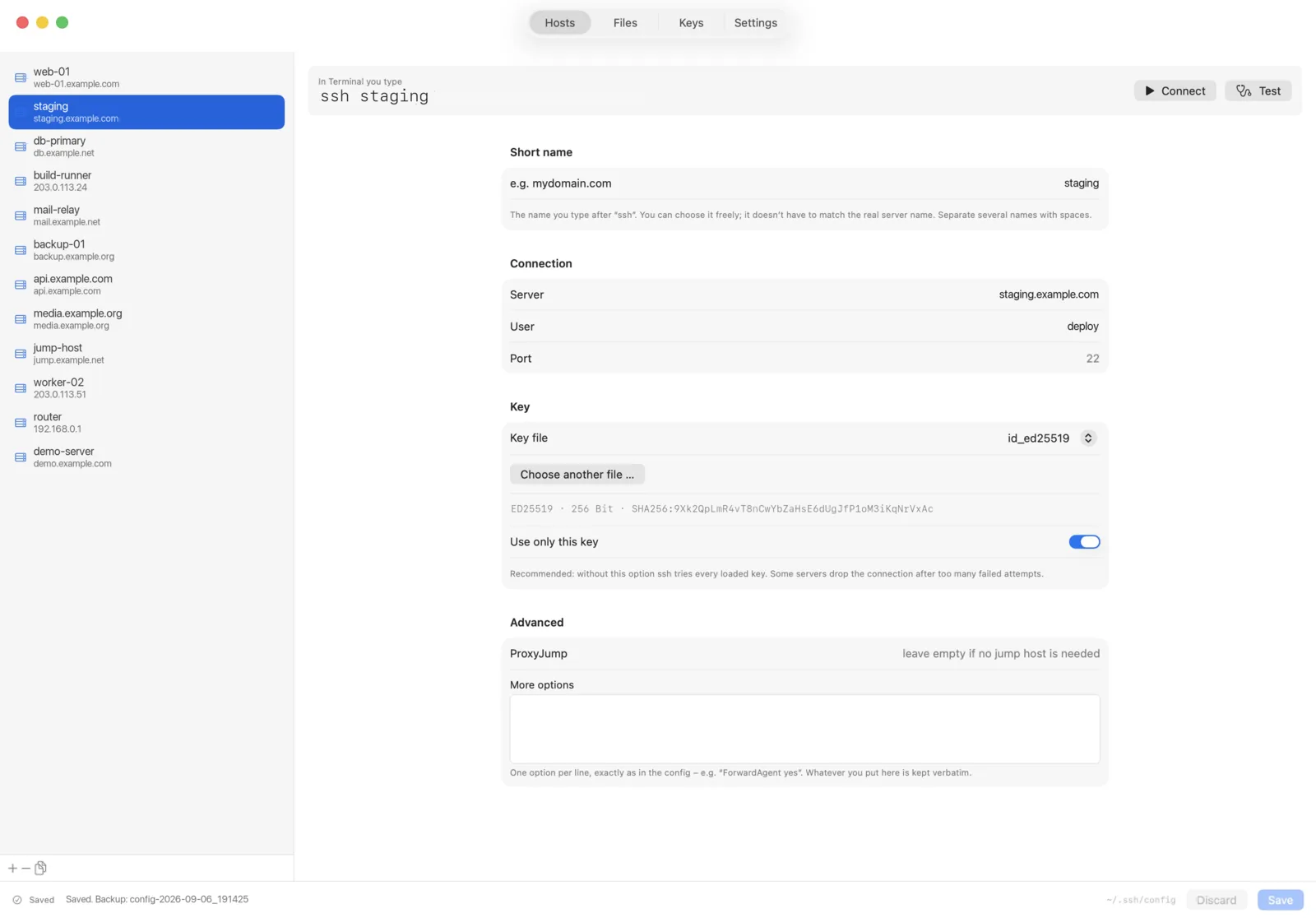
The host you need is one click away
Keep easySSH in the menu bar and open a saved host without searching your shell history. Choose Terminal or iTerm2 as the destination. easySSH enters the familiar ssh command; the connection itself remains visible and under your control.
Edit the config without flattening it
The host editor covers aliases, hostname, user, port, identity file and ProxyJump. Other SSH options remain available in a free-form field. Comments, indentation, unknown options and untouched sections keep their original form. Match blocks are left alone.
Saving is deliberate. easySSH writes only when you press Command-S, creates a backup first and refuses to overwrite a config file that another program changed in the meantime.
Use SFTP like a Mac file browser
Browse the remote server, drag files and folders to or from Finder, rename items, create folders and change permissions. A compact remote browser is the default; a two-pane view is available when you want local and remote folders side by side.
Transfers use the sftp client included with macOS and the hosts already defined in your SSH config. Repeated operations can share a connection, so moving through a server does not require a fresh login for every action.
Keep keys understandable
See the keys in your .ssh folder with their fingerprints, copy a public key and create a new Ed25519 key. Passphrases are passed to ssh-keygen through standard input rather than placed in the command line. easySSH verifies that a key meant to be protected is actually encrypted before keeping it.
A careful layer over OpenSSH
easySSH does not introduce a proprietary connection service or send your hosts through a Corebird server. It calls the SSH tools supplied by macOS. Existing keys, host checks, jump hosts and agent settings remain part of the standard SSH workflow.
Built-in safeguards
- a backup before every change to
~/.ssh/config, with the latest 20 retained - atomic writes and owner-only file permissions for the config and its backups
- protection against overwriting changes made in another editor
- a warning when the
.sshdirectory is accessible to other users - connection tests that turn common SSH errors into readable messages
Product facts
- System
- macOS 14 or later
- Architecture
- Apple silicon and Intel universal build
- Languages
- English, German, Spanish
- Uses
- OpenSSH, Terminal or iTerm2, optional login item
- Account
- Not required
- Subscription
- None
- Current status
- In development, distribution channel not decided
Questions
Before you write in
What does easySSH replace?
It replaces the need to hand-edit many everyday entries in ~/.ssh/config. It does not replace OpenSSH. Connections, host-key checks, authentication and SFTP are still handled by the tools included with macOS.
Does it import my existing SSH config?
easySSH reads the existing file in place. Supported fields appear in the host editor; unknown options remain available as text. Comments, indentation and untouched lines are preserved. Match blocks are not edited by the app.
Can easySSH overwrite changes from another editor?
It checks the file again before saving. If another program changed it after easySSH loaded it, saving is stopped and you are asked to reload. No automatic merge is attempted.
Where are my passwords and private keys stored?
easySSH does not maintain its own password vault. It works with the keys and SSH agent on your Mac. Keys you create are written to your .ssh folder. Never send a private key or passphrase to support.
Why does macOS ask for permission to control Terminal?
easySSH opens Terminal or iTerm2 and enters ssh followed by the selected host alias. macOS treats this as automation and asks for permission the first time. The setting can be changed later under System Settings, Privacy & Security, Automation.
Can I use ProxyJump or a non-standard port?
Yes. Both have dedicated fields. Additional OpenSSH directives can be kept in the advanced options field.
Longer answers
- Getting started with easySSH Set up a host, open your first connection, manage keys and transfer files with SFTP.
- Add your first host in easySSH Add an SSH host, understand the alias and server fields, save it safely and open the first connection.
- Edit your SSH config safely with easySSH Understand what easySSH changes, what it preserves and how backups protect an existing SSH configuration.
- Allow easySSH to open Terminal or iTerm2 Allow, review or revoke the macOS automation permission easySSH uses to start an SSH connection.
- Transfer files with SFTP in easySSH Connect to a saved host, upload and download files, use the two-pane view and change remote permissions safely.
- Create an SSH key with easySSH Create an Ed25519 key, protect it with a passphrase and install only its public part on a server.
- easySSH questions and answers Short answers on config editing, keys, SFTP, terminal automation and support requests.
Your SSH config remains the source of truth. easySSH simply makes it easier to work with.