
Mac app
spaceMD
Markdown, ready to read.
View formatted MD files without opening an app: with spaceMD, a single press of the space bar shows your MD document with all its formatting. Headings, lists, tables, task lists, footnotes and highlighted code included. For longer documents, open the same file in a focused viewer with search and an outline.
The viewer is free. Formatted Quick Look preview is a one-time purchase, with no subscription.
Requires macOS 14 or later. Built for Apple silicon and Intel. Available in English, German, Spanish and French.
Before and after
Same file, two ways of reading it
The same file, twice: what an editor shows and what spaceMD shows.
---
title: Field Notes from Alder Lake
date: 2026-09-07
tags: [research, field-notes, macOS]
status: ready for review
---

# A quiet morning by the water

The first survey started at **06:30**, just before sunrise. Visibility was good,
the air was cool, and the northern path was still wet from overnight rain.

> The useful details are often the small ones: a change in wind, a fresh track,
> or a call heard only once.

## Today’s observations

| Time | Location | Observation | Confidence |
| --- | --- | --- | ---: |
| 06:42 | North shore | Two kingfishers crossing east | High |
| 07:15 | Reed bed | Otter tracks near the waterline | Medium |
| 08:05 | Old footbridge | Water level 8 cm above marker | High |

### Survey checklist

- [x] Record temperature and wind
- [x] Inspect the northern nesting boxes
- [ ] Replace the marker beside post 14
- [ ] Review the evening audio sample

## Sample analysis

The recorder exports one measurement per line. This small Swift function keeps
only values inside the expected range:

```swift
func validReadings(_ values: [Double]) -> [Double] {
    values.filter { reading in
        (0.0...100.0).contains(reading)
    }
}

let waterLevels = [7.8, 8.0, 8.1, 147.0]
print(validReadings(waterLevels))
```

The outlier remains in the source file for review. The formatted report never
changes the original measurements.

## Next visit

1. Start at the old footbridge.
2. Walk the eastern path.
   - Photograph the marker posts.
   - Note any fresh storm damage.
3. Compare the new readings with the September baseline.[^baseline]

Useful reference: [Markdown Guide](https://www.markdownguide.org/)

---

*Prepared for the weekly habitat review.*

[^baseline]: The baseline is the median of the first seven measurements taken this month.
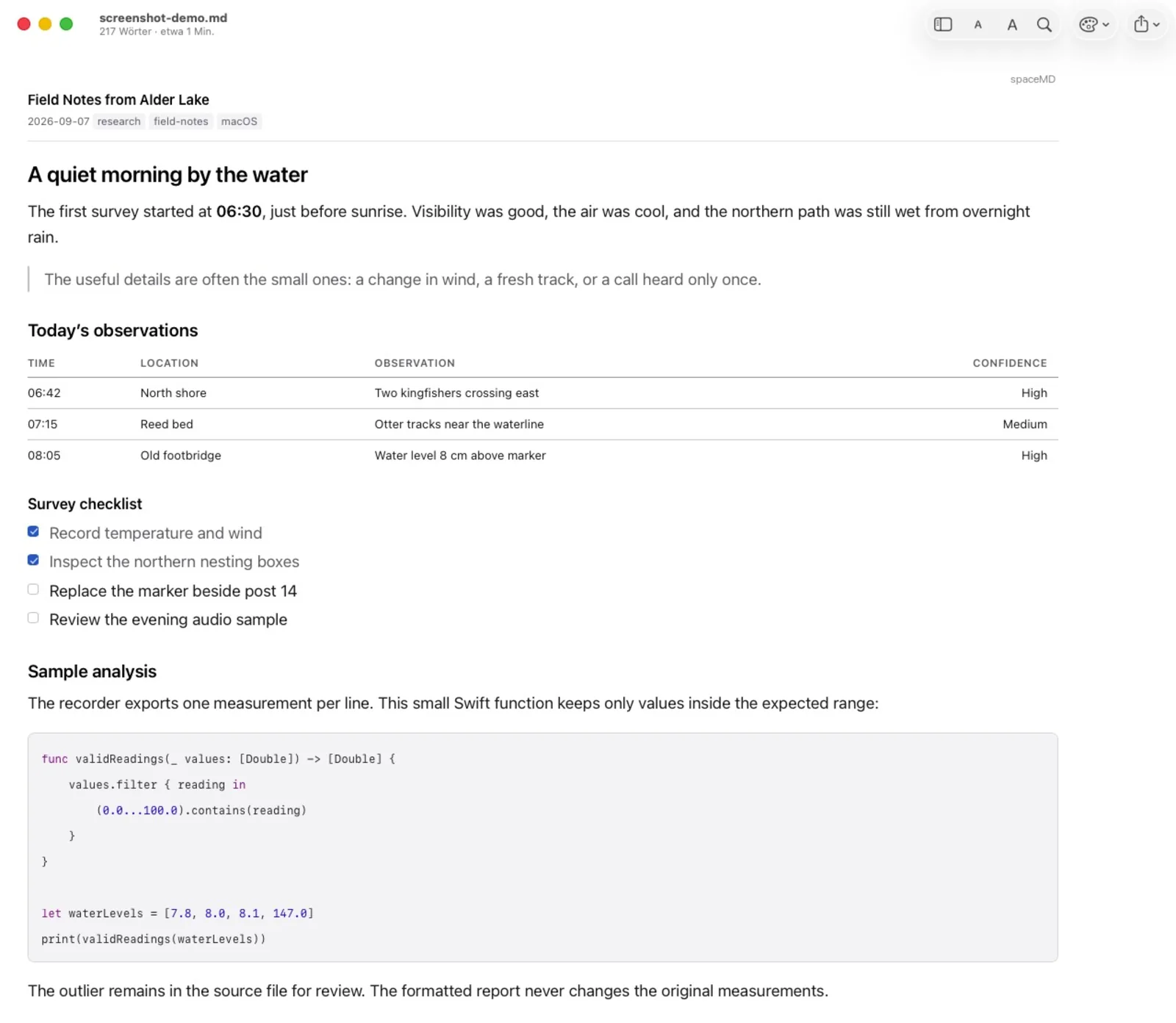
Field Notes from Alder Lake
A quiet morning by the water
The first survey started at 06:30, just before sunrise. Visibility was good, the air was cool, and the northern path was still wet from overnight rain.
The useful details are often the small ones: a change in wind, a fresh track, or a call heard only once.
Today’s observations
| Time | Location | Observation | Confidence |
|---|---|---|---|
| 06:42 | North shore | Two kingfishers crossing east | High |
| 07:15 | Reed bed | Otter tracks near the waterline | Medium |
| 08:05 | Old footbridge | Water level 8 cm above marker | High |
Survey checklist
- Record temperature and wind
- Inspect the northern nesting boxes
- Replace the marker beside post 14
- Review the evening audio sample
Sample analysis
The recorder exports one measurement per line. This small Swift function keeps only values inside the expected range:
func validReadings(_ values: [Double]) -> [Double] {
    values.filter { reading in
        (0.0...100.0).contains(reading)
    }
}

let waterLevels = [7.8, 8.0, 8.1, 147.0]
print(validReadings(waterLevels))
The outlier remains in the source file for review. The formatted report never changes the original measurements.
Next visit
- Start at the old footbridge.
- Walk the eastern path.
- Photograph the marker posts.
- Note any fresh storm damage.
- Compare the new readings with the September baseline.1
Useful reference: Markdown Guide
Prepared for the weekly habitat review.
The baseline is the median of the first seven measurements taken this month. ↩
Read first, without opening an editor
READMEs, notes and project documentation are often opened just to answer one question. spaceMD keeps that moment short. Quick Look works where it always has: select the file, press Space and continue through the folder with the arrow keys.
The preview supports GitHub-flavoured Markdown, including tables and task lists. Code blocks are highlighted for common languages. YAML frontmatter becomes a compact document header instead of an unexplained block at the top of the page.
A viewer for the longer page
Open a document in spaceMD when a preview is not enough. Search within the text, move through a clickable outline and adjust the type size. Multiple files can be kept in tabs, and the view updates when an editor saves the file in the background.
Choose from System, Newspaper and Terminal themes, set the line length, show word count and reading time, print the document or save it as a PDF.
Local images, with permission
macOS gives a Quick Look extension access to the selected Markdown file, not automatically to every image beside it. If a document uses local images, you can grant spaceMD access to the relevant folder. Without that permission, the text still renders and image placeholders remain visible.
Remote images and tracking pixels are not loaded. Links open in your default browser only after you click them.
A reader, deliberately not an editor
spaceMD opens Markdown files for viewing and does not change their contents. Keep writing in the editor you already use. This clear division also means an automatically refreshed view cannot overwrite the file you are working on.
Private by design
Documents are rendered locally on your Mac. There is no Corebird account, advertising or analytics SDK. The app checks purchases through Apple's StoreKit, but your documents are not sent to Corebird or Apple for rendering.
Themes
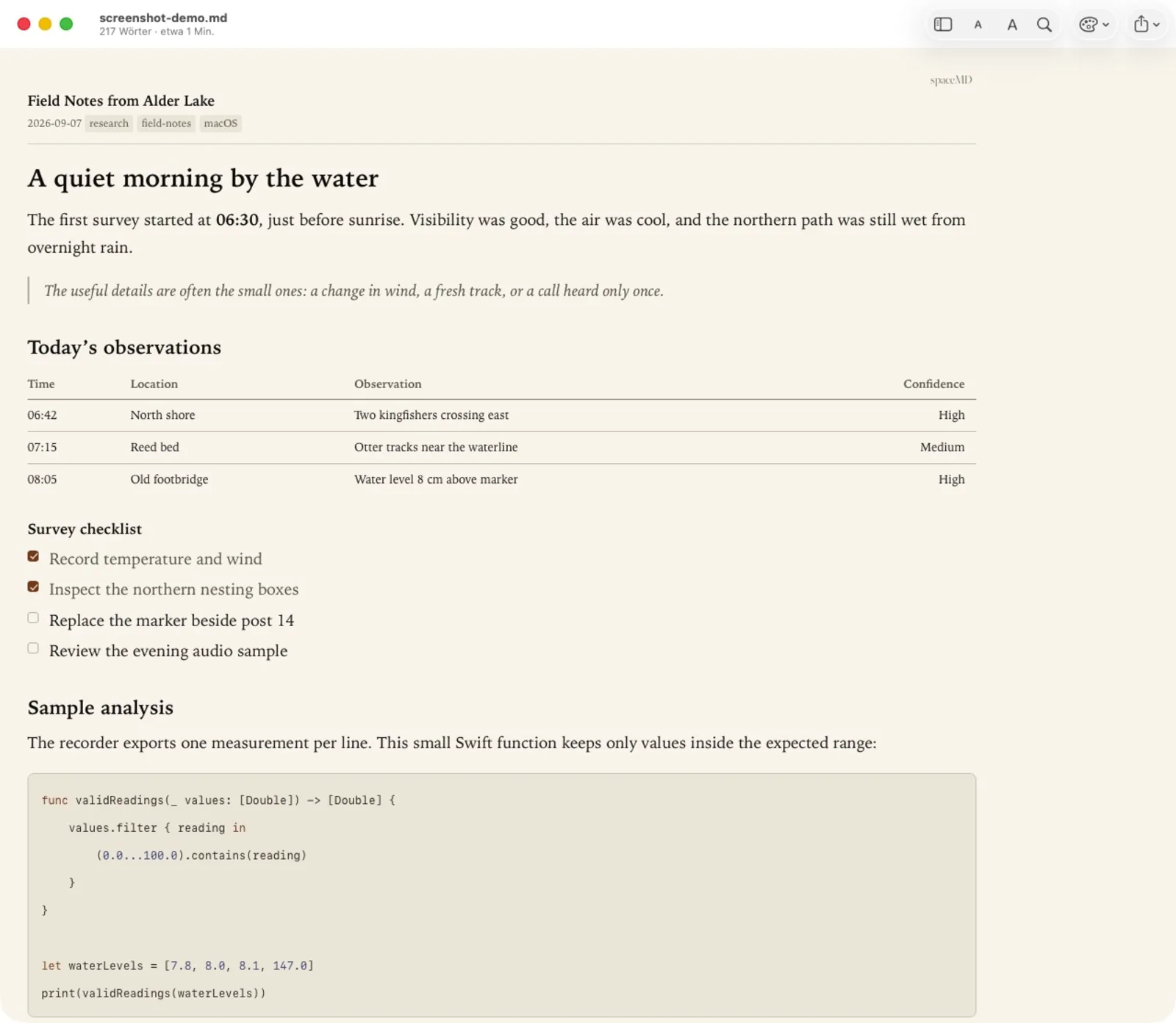
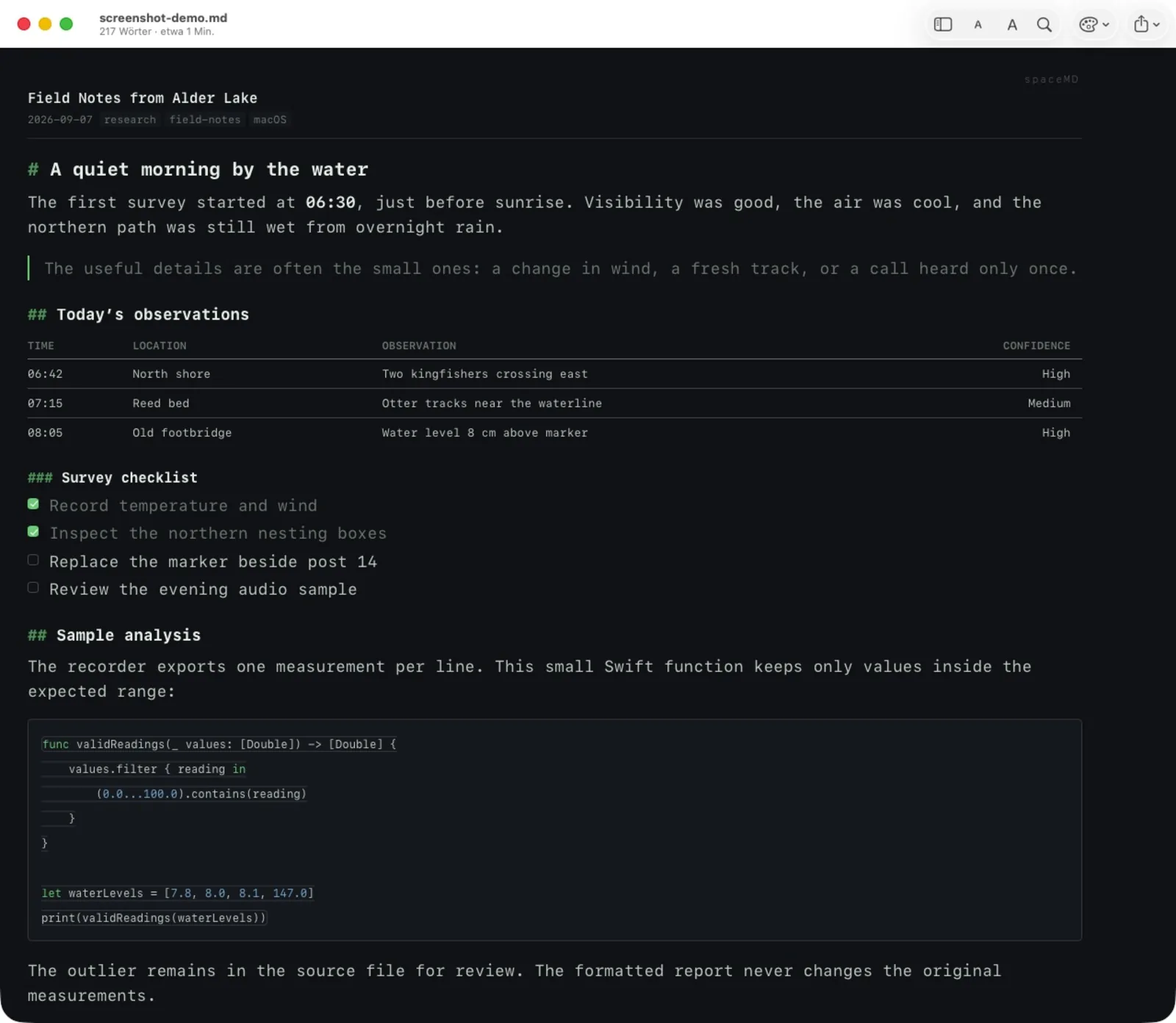
One document, three ways to read it
The content stays the same. Only the presentation changes, so a README can look like the system, like a printed page or like a terminal.
Product facts
- System
- macOS 14 or later
- Architecture
- Apple silicon and Intel
- Languages
- English, German, Spanish, French
- File types
- .md, .markdown, .mdown, .mkd, .mkdn, .mdwn, .mdtxt, .mdtext
- Viewer
- Included free of charge
- Finder Quick Look
- One-time in-app purchase, no subscription
- Account
- Not required
- Current status
- Version 1.0 on the Mac App Store
Questions
Before you write in
What is included for free?
The complete spaceMD viewer is free, including search, outline, themes, tabs, printing and PDF export. Formatted Markdown in Finder Quick Look is unlocked with one non-consumable in-app purchase. There is no subscription.
What happens in Quick Look before I unlock it?
The Space bar continues to show the Markdown source as plain text, together with a short explanation of the optional formatted preview. You are not left without a preview.
Does spaceMD edit my files?
No. spaceMD is a viewer. It reads Markdown documents and refreshes the view when your editor saves a change, but it does not write back to the source file.
Why is a local image missing?
Quick Look receives permission for the selected Markdown file, not automatically for nearby images. Open spaceMD settings and add the folder containing the document and its images under Folders for images. Only grant folders whose contents you want the app to read.
Does spaceMD load remote images?
No. HTTP and HTTPS images and other remote page resources are blocked, including tracking pixels. When you deliberately click a link, it opens in your default browser.
How do I restore the purchase on another Mac?
Open spaceMD settings and choose Restore. The Mac must be signed in to the Apple Account used for the purchase. StoreKit asks Apple for the current entitlement; Corebird does not receive your payment details.
Longer answers
- Using spaceMD in Finder and the viewer Read Markdown with the Space bar, use the viewer, show local images and unlock Quick Look.
- Set up formatted Markdown in Quick Look Install spaceMD, unlock formatted Quick Look, enable its extension and check the result with a Markdown file.
- Quick Look still shows plain text Check the app location, Quick Look extension, cached provider and purchase state when Markdown stays unformatted.
- Show local images in spaceMD Grant access to a document folder so spaceMD can display local images without loading remote resources.
- Make spaceMD the default Markdown viewer Choose spaceMD for double-clicked Markdown files, restore your editor later and understand the document icon.
- Print Markdown or save it as a PDF Print a Markdown document from the spaceMD viewer or create a PDF without changing the source file.
- spaceMD questions and answers Short answers on the free viewer, the Quick Look purchase, images, printing and refunds.
Markdown stays plain text on disk. It just becomes easier to read when you need it.